Indian Mound Cottage scan plan
The Rockefeller Cottage, next to the Jekyll Island Club. 3 floors, 25 rooms (9 bedrooms, 9 baths, 7 servant rooms), about 12,000 sq ft, plus the full outside perimeter. It's an operating museum; the tour is for marketing and ADA access, so people will "walk" it online.
1Who and where
- Meet Will Story (museum director) at the Mosaic, Jekyll Island Museum.
Office (912) 635-4168 · Cell (912) 230-0936 - RCE project manager: Sherry Rennick (833) 723-8326
- Call Will before you arrive and introduce yourself as a technician with Reality Capture Experts (RCE's rule).
- The museum will block off that house so no visitors walk into your scans.
2What the client asked for
"Good scan positions to enable viewers to access all of the objects in the home, with a good symmetry of walking path, before and after each threshold. Dense scan positions best."Sherry Rennick, RCE, Nov 3
In plain words:
- More scans than a normal house. Every object on display should be visible up close from the tour.
- Straight, centered walking lines through rooms and hallways, not zig-zag.
- A scan right before and right after every doorway.
3Before the first scan
- Walk the whole house first with Will. See all 3 floors, the rooms included, and what's on display.
- All ceiling lights ON. All ceiling fans OFF.
- Toilet seats DOWN in all 9 bathrooms (marketing job).
- Doors: decide open or closed and keep them that way the whole time. Close doors to areas that are not part of the tour.
- Ask Will: may you open drapes/blinds, and are any rooms or roped areas off-limits for the tripod?
- Start on the lowest floor and work up. It's easier to set the tripod going up the stairs.
4The numbers
1 step = a normal walking step, about 2.5 ft.
3–4 steps8–10 ftBetween scans in normal rooms and hallways (RCE guide). Keep the count the same each time so the spacing looks even.
2–3 steps5–7 ftBetween scans in rooms full of museum pieces. Sherry asked for dense scans.
1 step2–3 ftOne scan 1 step before each doorway and one 1 step after it.
1 short step18–24 inMinimum distance from walls, furniture and displays, so the model doesn't warp.
4 spots1–2 stepsAround every painting and important object, 1–2 steps from the piece (see step 5).
5Scanning the objects (museum rule)
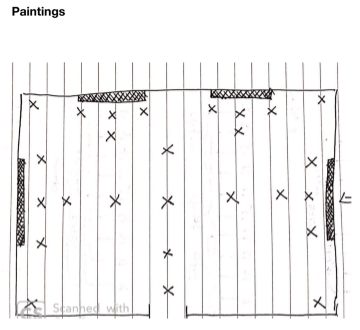
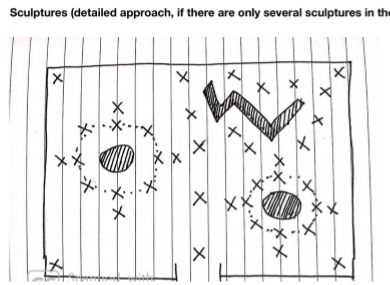
From RCE's field guide, page 36, "Retail, Showrooms & Exhibits", the section Sherry pointed to:
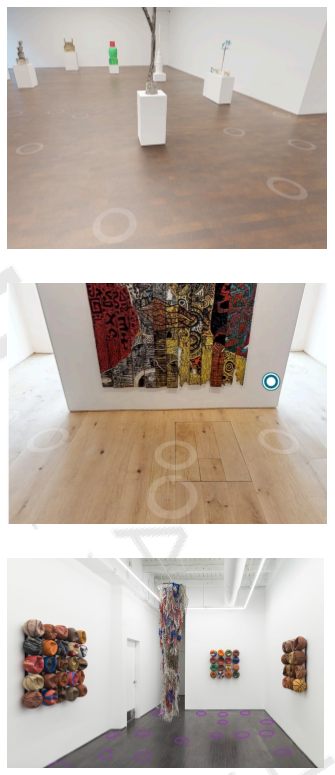
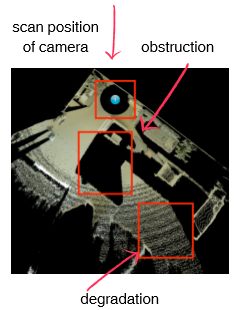
- Paintings and photos on the wall: 4 spots each. One close, one a step back (to see the whole piece), one on each side. On the close one, don't let the blurred spot under the camera land on the art.
- Furniture, sculptures, objects in the room: place a ring of scans around them, from at least 4 angles, without getting too close. Check the preview as you go.
- Glass display cases and framed glass: watch for your own reflection and the camera's. Step aside so you're not in the shot.
- If something important can't connect to the main path, add 360 views there.
6Stairs and floors
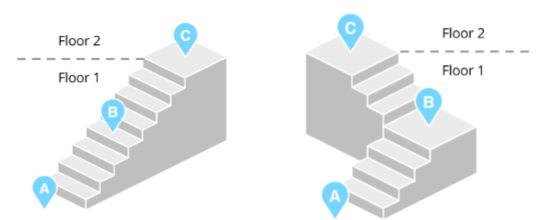
- Scan the floor, end back at the stairs, then scan up the stairs. Start a new floor in the Capture app at the top.
- On the stairs: two tripod legs on the lower step, one on the upper step.
- If there are several staircases, scan only the main one.
7Check the map after every room
- Black areas on the mini-map = the camera couldn't see there (behind furniture, or too far). Add a scan from another angle.
- Mark windows and mirrors as you go (marks facing in). Use trim marks (facing out) on areas that aren't part of the tour.
- Check every new scan connects to the last one. If not, move closer to the previous spot.
8Outside
- Main lap: walk the whole perimeter 4–6 steps (10–15 ft) out from the walls, with scans 3–4 steps (8–10 ft) apart so they connect.
- Wide shots of the whole house (all 3 stories and the roof): add a few scans 12–20 steps (30–50 ft) away: one straight in front of the main facade, one at each corner (two sides at once), one in front of the back or side porch.
- Step out in stages so the far scans still connect: about 6, then 12, then 18 steps (15, 30, 45 ft) from the wall. Don't jump straight to the far spot.
- Put a scan at every entrance, front and back. That's part of the ADA purpose.
9Before you leave and upload
- Look over each floor's map: complete, organized, scans lined up with doorways and hallways.
- In the Capture app, name it: Indian Mound Cottage, 100 Stable Rd, Jekyll Island, GA 31527 (name and address on one line), and fill in the full address.
- Upload the same day to RCE's Matterport account, not ours. The login is in the work order PDF in your email ("Job Updated | Jekyll Island Historic District-4730").
- After it processes, open the model and check it. Fix and re-upload if needed.
- Reply to RCE's end-of-day email the same day (upload done, any notes).
Plan: leave home at 6:45 AM, arrive about 8:15 (1h30 drive + island entry). Meet Will at 9:00. Take the time you need to do it right (about 4 to 5 hours on site, done around 2:00 PM). Upload the same day.
Based on Sherry Rennick's text of Nov 3 and the RCE Network Team Field Guide (pages 8, 13, 30, 33–36). Prepared for Megapixeler.